
- Your domain system should include at least one Domain Controller and one sharing host thathas joined the domain system.
- Install the vMatrix Server Manager on the sharing host(s).
- Create users on the Domain Controller.(Note: As the users are not created through vMatrix Server Manager, you have to manually add the created non-administrator users to the Remote Desktop Users group.)
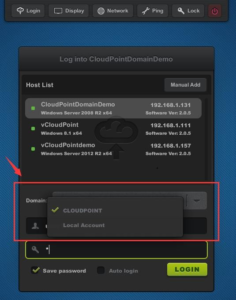
- Log into the host with vCloudPoint zero clients. Hosts will automatically be recognized if they have joined the domain. The picture below shows two login options: the first domain name “CLOUDPOINT” is chosen for domain login; the second one “Local Account” is for local account login. If users choose local account login, they are logging on the host rather than the domain.
- Select a domain, and then enter your user name and password.
IMPORTANT NOTE:
- You cannot log in a domain administrator account from a zero client. This will causeunavailability of the whole vMatrix and zero client system. If you mistakenly do this, remove administrators from vMatirx Server Remote Users group on the shared hosts thought Computer Management –> Local users & groups –> groups–> vMatirx Server Remote Users group
- DomanNTLM is not supported.
- By default, only users in the Administrator Group can log into the remote DomainController, users in the Remote Desktop User Group cannot login
- If you are using vMatrix Server Manager 1.6.0.4 or earlier, you have to install thevMatrix Server Manager both on the Domain Controller and Hosts. If you do not want to install vMatrix Server Manger on Domain Controller, please upgrade vMatrix Server Manager to 6.0.5 or later.
.
Anti-virus, firewall, and other types of security software can sometimes interfere with the initial configuration or continued operation of vCloudPoint vMatrix Server Manager software. This document gives basic information on applications, services, and network communication within vMatrix Server Manager, which can be used to configure security software and help ensure compatibility and stable, continued operation.
vMatrix Server Manager Installation
Please make sure to DISABLE any Anti-Virus or Firewall software during the installation of vMatrix Server Manager. Software of this type has been tested and known to interfere with the installation of our product. After installation has completed, you may re-enable Anti-Virus and Firewall software.
If system instability occurs after installing vMatrix Server Manager, please try removing vMatrix and any anti virus or security software present, and then re-installing vMatrix. If the system is stable in this configuration, re-install the anti-virus software. In some cases, this change in install order can improve the interaction between vMatrix and anti-virus software. If issues persist, please try configuring your security software to ignore/allow/trust the following ports and executables:
Exceptions
- Port Exceptions
- Remote Desktop Services: TCP 3389
- vMatrix Network Services: TCP 13389-13342 plus 3 per user
- UDP 13389
These ports are default settings on vMatrix’s installation but can be customized at vMatrix
-> Configuration ->IP/TCP ports.
2)File Access Exceptions
- On Firewall:
C:\Program Files\Cloudpoint\vMatrix\CpDaemon.exe C:\Program Files\Cloudpoint\vMatrix\Driver\CpAccel.exe
- On Anti-virus:
■ By specific files:
—For vMatrix functionality
C:\Program Files\Cloudpoint\vMatrix\CpDaemon.exe C:\Program Files\Cloudpoint\vMatrix\Driver\CpAccel.exe
—For vMatrix tray icon and User functionality C:\Program Files\Cloudpoint\vMatrix\CpDeploy.exe
—For vMatrix Admin manager
C:\Program Files\Cloudpoint\vMatrix\CpManager.exe
—For vMatrix Diagnostic tools
C:\Program Files\Cloudpoint\vMatrix\DiagnosticTools.exe
—For vMatrix Install and Update deploy tools
C:\Program Files\Cloudpoint\vMatrix\InstallDeployTools.exe
■ By folder:
—For all vMatrix functionality
C:\Program Files\Cloudpoint\vMatrix
For remote connection with vCloudPoint zero clients over WAN, setting DMZ host is the easiest way but unsafe, therefore, you can add these ports in your router instead.
The vMatrix Network Service uses both TCP and UDP ports. The broadcast port is fixed using UDP 13389, and the listen port begins with TCP 13389 and extends to at least 3 extra plus 3 for each user. For example, if there are 10 users need to connect remotely, you need to at least add ports of UDP 13389-13389, TCP 13389-13422 (13422 is the minimum and reserve more if possible).
The listen port for Remote Desktop Service itself also should be open. It uses TCP 3389.
These ports are default settings on vMatrix installation but able to be customized at vMatrix -> Configuration ->IP/TCP ports.
By default, theme and wallpaper customization is disabled for terminal users through remote desktop connections. Administrators can enable this option for terminal users through a few simple steps. But enabling this option will increase large resources consumption on the host.
Here are steps to enable theme and wallpaper customization on Windows:
1. For hosts running Windows Client Systems like XP, 7, 8, 8.1, 10 (Desktop Experience features of client systems are pre-installed on system installation).
- Open vMatrix Server Manager, on the initial User Management page, right click on the user module and then select “Property” to enter the user’s personal (If you are configuring for all users at a time, go to “Configurations” -> “Default User Settings”.)
- Click on “Advanced” tag and then select “optimum” to enable all desktop experience options including wallpapers, themes, menu animations, and window content on To only enable a single desktop experience option like wallpapers or themes, you can click on a “custom” button for further customization.
- Scroll down to “Desktop Options”, select the options which you like to enable, and
- The change will take effect on the user’s next
2. For hosts running Windows Server Systems like Server 2008R2, 2012, 2012R2, 2016 and Multipoint Server 2011, 2012 (Desktop Experience features for server systems are not installed on system installation).
- For server systems, you have to install the Desktop Experience features before configuring at vMatrix Server Manager.
- Open Windows Server Manager;
- Click“Add roles and features”;
- Search for Features –> Desktop Experience;
- Confirm to install Desktop Experience features;
When completed, restart the system and then open vMatrix Server Manager to enable the Desktop Experience options as the same to configure for Windows Client Systems mentioned above.
If you purchased a non-WIFI model of vCloudPoint zero clients, but later you want to work in the wireless environment, you can turn the zero client into a WIFi supported one by simply attaching a compatible external USB antenna to the vCloudPoint zero client. There are two ways for you to get the external USB antenna.
1, You can purchase the external USB antenna from your local vCloudPoint dealer.
2, Any antenna that is built with RTL8188EUS chip and connects with USB 2.0 standard is supported by vCloudPoint zero clients.
Steps to configure external WIFI:
1, Attach the USB antenna to the zero client
2, Reboot the zero client
3 Go to the “Network” page and you will see the WIFI option coming.
1, Most popular Windows applications can be run with vCloudPoint zero clients such as Office Applications, Skype, Outlook, Chrome, Firefox, IE, Edge, Teamviewer, Adobe Photoshop, Adobe Illustrator, Adobe After Effects, Adobe Indesign, AutoDesk CAD, and Camtasia, etc.
2, 3D games are not supported. 3D design applications like 3D Max can be run but rendering takes long time. Other 3D applications may not be supported as graphic card is not utilized by the zero clients. When the host and network is well configured, the performance of the zero client is just like that of the host without a discrete graphic card.
3, A few applications cannot be run in the multi-user environment.
These Known applications include Microsoft Visual Studio, Adobe Premiere and Foxmail. To know if your desired applications can be run in the multi-user environment without vCloudPoint zero clients, you can try running the applications in remote desktop sessions with PCs (run “mstsc”).
Trouble-shooting some applications that are supposed to by supported but still cannot be run with vCloudPoint zero clients:
1, The disk partition where the applications are installed must be set to be visible to terminal users. To configure visible disk partitions, open vMatrix Server Manager, click Configuration, and then Storage Visibility, tick the partition where your applications are installed.
2, Try disabling Windows UAC.
3, Change installation directory to non-user based. Default installation directory of some applications like Kingsoft WPS are user based, like “C:\Users\Administrator”. When installing, you must change the directory to non-user based one, such as “C:\Program files\” otherwise users except the installer are not able to run these applications.
1)Before you report an issue to vCloudPoint Support Team, please run the vMatrix Diagnostic Tool or. Also, if possible, you can take the following solutions to fix or localize the issue.
- Reboot host system
- Disable security software and re-install vMatrix
- Install a previous or new version of vMatrix
- Reset client device firmware
- Use another host system
- Use another host
- Use another zero client
- Replace the Ethernet cable
- Try with a PC through Windows Remote Desktop Connection
2)If you cannot fix the issue by running the vMatrix Diagnostic Tool or following the FAQ guides but need to report to vCloudPoint support team for help, please describe the issue as detailed as possible and provide sufficient information. If possible attach screen shots or videos when reporting the issue. Visual information can better help our support team analysis the issue.
Issue Description:
- The issue subject.
- Detailed operations you did when having the issue.
- Error message(s) from vMatrix Server Manager, zero client or Diagnostic Tool.
- Any solutions you take.
- If the vCloudPoint system was working fine before, and changes done lately.
- If it is a possible issue or can be triggered anytime; the procedure for vCloudPoint Support Team to trigger the issue in vCloudPoint Lab.
Required Information:
Provided on most cases:
- Host operating system, 32 bit or 64 bit and build number if it is the latest system, e.g.: Windows 10.
- vMatrix version and device firmware version: x.x.x.xxxxx.
- vMatrix error log; export the vMatrix log at Windows Event Viewer which can be opened at vMatrix Server Manager -> Log -> Event Log or Windows Start menu; vMatrix log often can be found under Applications and Services, but in some cases, there is also vMatrix logs under Windows Logs-> Application; Export and send us both vMatrix Logs if there are.
Provided if there is:
- Error message when running vMatrix Diagnostic Tool
- Before you report an issue to vCloudPoint Support Team, please run the vMatrix Diagnostic Tool Also, if possible, you can take the following solutions to fix or localize the issue.
- Reboot host system
- Disable security software and re-install vMatrix
- Install a previous or new version of vMatrix
- Reset client device firmware
- Use another host system
- Use another host
- Use another zero client
- Replace the Ethernet cable
- Try with a PC through Windows Remote Desktop Connection
- If you cannot fix the issue by running the vMatrix Diagnostic Tool or following the FAQ guides but need to report to vCloud Point support team for help, please describe the issue as detailed as possible and provide sufficient information. If possible attach screen shots or videos when reporting the Visual information can better help our support team analysis the issue.
Issue Description:
- The issue subject.
- Detailed operations you did when having the issue.
- Error message(s) from vMatrix Server Manager, zero client or Diagnostic
- Any solutions you
- If the vCloudPoint system was working fine before, and changes done
- If it is a possible issue or can be triggered anytime; the procedure for vCloudPoint Support Team to trigger the issue in vCloudPoint
Required Information:
Provided on most cases:
- Host operating system, 32 bit or 64 bit and build number if it is the latest system, e.g.:Windows
- vMatrix version and device firmware version: x.x.xxxxx.
- vMatrix error log; export the vMatrix log at Windows Event Viewer which can be opened at vMatrix Server Manager -> Log -> Event Log or Windows Start menu; vMatrix log often can be found under Applications and Services, but in some cases, there is also vMatrix logs under Windows Logs-> Application; Export and send us both vMatrix Logs if there
Provided if there is:
- Error message when running vMatrix Diagnostic Tool Provided on specific issues:
- When the client device prompts “invalid serial number” or client devices got disconnected every a few minutes — serial number(s) of the client device(s)
- When the client device prompts “invalid serial number” or client devices got disconnected every a few minutes — serial number(s) of the client device(s)